
ALV set_table_for_first_display select rows
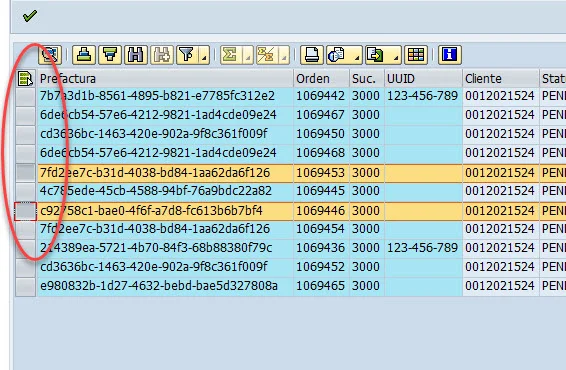
set_table_for_first_display its a method used to show information into an ALV grid control, some times its neccesary slect some rows, to do this its neccesary add some code lines.
Code example:
his code its used to display information on ALV
CALL METHOD g_grid->set_table_for_first_display
    EXPORTING
      it_toolbar_excluding = gt_exclude
      i_structure_name     = 'ZSD_PREFACTURA'
      is_variant           = gs_variant
*     i_save               = 'A'
      is_layout            = gs_layout
    CHANGING
      it_fieldcatalog      = gt_fieldcatalog
      it_outtab            = t_prefacturas.
With this code we gets a result like this:

Now we are goning to add a button to select multiple rows, we need to add two code lines:
gs_layout-cwidth_opt = 'X'.
gs_layout-sel_mode = 'A'.
Our code now shows like this:
  gs_layout-cwidth_opt = 'X'.
  gs_layout-sel_mode = 'A'.


  CALL METHOD g_grid->set_table_for_first_display
    EXPORTING
      it_toolbar_excluding = gt_exclude
      i_structure_name     = 'ZSD_PREFACTURA'
      is_variant           = gs_variant
*     i_save               = 'A'
      is_layout            = gs_layout
    CHANGING
      it_fieldcatalog      = gt_fieldcatalog
      it_outtab            = t_prefacturas.
Now if we run our code we will see our button to select rows:

Hi there,
This is great job!
I have been struggling with this issue for hours and had no clue what could be the solution.
Thanx!
BR, Sándor